Weekend Trip Package: Taxi Billing and Duty Slip Guide
A short leisure package covers a defined weekend service period with agreed distance or time limits. This guide explains how to organize weekend trip package paperwork, prepare a clear customer invoice and review payment records. It is an information page, not a booking service or an automatic redirect to an app store.
A short leisure package covers a defined weekend service period with agreed distance or time limits. Start by agreeing who requested the service, which independent operator will supply it and which customer should receive the bill. The passenger, booking contact and paying organization may be different people. Establishing those roles before the journey reduces corrections when a document reaches a family member, travel agency or company accounts team.
For this assignment, the practical recordkeeping priority is simple: Record the package dates, included travel, customer-approved extensions and actual close-out details. Keep that information with the original booking instructions so the person preparing the invoice is not relying on memory. A taxi billing app can organize the billing document, but the business must still check that the underlying information describes the actual service.
02 / 07
Confirm the fare basis and customer instructions
Before creating a bill, identify whether the agreement uses a fixed transfer price, an hourly allowance, a distance basis or another stated package. These are commercial terms, not interchangeable labels. Record what was included and which extras require customer approval. For weekend trip package, a clear explanation of the original agreement is more useful than a final total without context.
A weekend label does not justify an additional premium unless it was disclosed and agreed. If the itinerary, service period or paying party changes, keep a record of the approved revision. Do not assume a taxi bill generator calculates every possible fare rule automatically. Compare the fields available in the current app with your actual agreement and maintain supporting notes for details that belong outside the invoice.
03 / 07
Keep a useful weekend trip package duty slip
A duty slip is the operational trip record that helps you review an assignment before billing. Use the relevant journey date, customer reference and service details consistently. Record the package dates, included travel, customer-approved extensions and actual close-out details. Capture information when it is available rather than trying to reconstruct it at the end of a busy day. Check any readings or time notes against supporting records.
Taxi duty slip software should fit the way your team records a journey. Review the app tutorial and available fields before depending on a particular format. A duty slip is not automatically a tax invoice, a customer receipt or proof of payment. Reconcile the trip record with the agreed charges, resolve missing information, and then prepare the customer-facing bill.
04 / 07
Create and review the customer invoice
Use your taxi invoice generator to prepare a recognizable document for the weekend trip package service. Confirm the billing name, business identity and journey reference before checking the charge breakdown. A customer should be able to understand what was supplied, when it happened and why the amount is due without needing a separate explanation of every line.
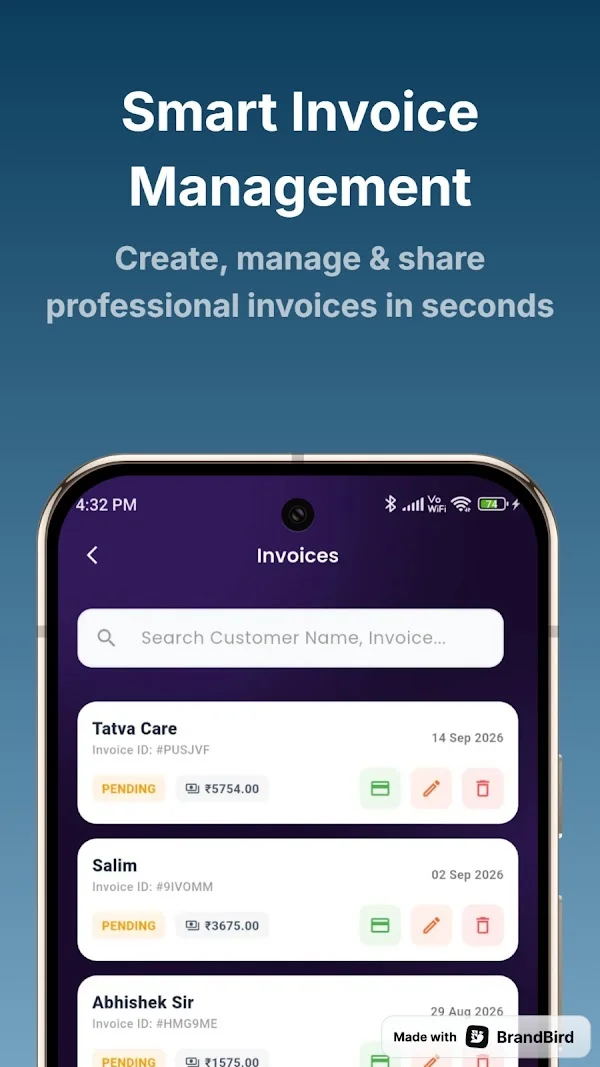
TaxiCabBill supports business-profile customization including a logo, signature, stamp and payment instructions. Check those details before sharing a document, particularly if your contact or payment information has changed. A cab invoice generator helps with presentation and record organization; it does not remove the need to verify figures, apply the correct tax treatment or follow your own invoice correction process.
05 / 07
Review payment status and find older records
After issuing the weekend trip package invoice, review whether the amount is paid or pending using the evidence your business retains. A saved invoice does not prove that money reached your account. Match the customer and journey to the correct payment reference before updating the billing status, especially when one organization pays for several assignments together.
TaxiCabBill presents total, paid and pending amounts and searchable invoice history. These can support a regular follow-up routine for unpaid documents. Taxi payment tracking software is not necessarily a payment gateway, automatic bank reconciliation service or complete accounting package. Keep any separate accounting records you need and confirm how partial payments or disputed balances should be handled in your chosen workflow.
06 / 07
Check PDF sharing and choose the right workflow
If the customer needs a PDF, review the finished document before sending it. Check that the weekend trip package reference, business details and totals match the saved invoice. Use clear file organization so an accounts team can identify the right journey. Advanced PDF invoicing and sharing are listed under TaxiCabBill's yearly premium subscription; confirm the current plan inside the app.
People searching for online taxi billing software or a free taxi billing app should understand the available workflow before they commit. TaxiCabBill is an Android app downloaded through Google Play. This website explains the product and does not contain a browser invoice editor. It does not promise unlimited free PDF exports, automatic statutory compliance or features that have not been confirmed in the current app.
07 / 07
Responsibilities and a final trip check
Before closing this assignment, compare the invoice with the agreed weekend trip package service, confirm the payer and retain the supporting trip record. A weekend label does not justify an additional premium unless it was disclosed and agreed. Where a customer has a special document requirement, confirm it before sharing the final version. Keep personal information limited to what is genuinely needed for the service and billing process.
The company does not own any vehicle or operate rides. It acts as an intermediary connecting independent commercial tour operators with customers. The independent operator and customer must confirm the actual service arrangements. Billing guides explain paperwork and do not certify vehicle condition, permits, driver suitability or service availability. Use the related guides below to review a different trip type or strengthen your everyday invoice routine.
Straight answers
Frequently asked questions
Does this page book a weekend trip package service?
No. This is a trip-document and billing guide. Confirm service arrangements with the independent operator. The company owns no vehicles and does not operate rides.
What should I check for weekend trip package billing?
Record the package dates, included travel, customer-approved extensions and actual close-out details. A weekend label does not justify an additional premium unless it was disclosed and agreed.
Can I create invoices on this website?
Invoice creation takes place in TaxiCabBill for Android. These pages remain on the website; only clearly labeled Google Play download links open the app listing.
Is PDF export free?
Advanced PDF invoicing and sharing are listed under the yearly premium subscription. Check current access and plan terms in the app.
Available on Android
Try TaxiCabBill with your own trips.
Install from Google Play, set up your business profile and check current plan details in the app.